Clipboard Action 1.3.2
09.01.2018

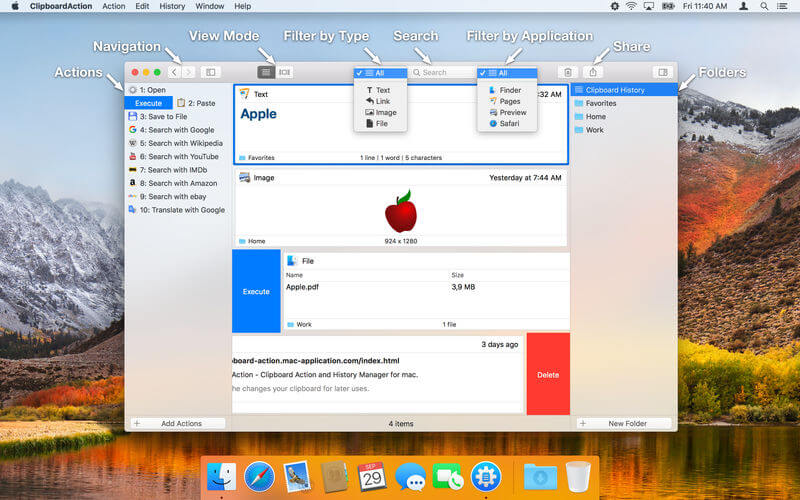
Clipboard Action - простой менеджер истории буфера обмена для Mac. Он сохраняет все изменения, которые были добавлены в буфер обмена для последующего использования.
Key features:
- View Modes - List and detail view mode.
- Native Mac Interface - Execute action or delete content by swipe gesture.
- Browsing Clipboard History - By swipe gesture, navigation buttons or keyboard shortcuts.
- Default Application Actions - Open, Save to File and Search with Google.
- Custom Actions - User defined actions using AppleScript or Automator Workflow.
- Folders - Organize your content to Folders.
- Search and Filter Content - text search and filter by content type or by aplication from which was content copied.
- Content Selection - There is no need to work with the whole content, just select a part of text and work with them.
- Content Sharing - Share clipboard content with your friends.
- Drag and Drop - Drag and drop content to any application.
- Global Shortcuts - Show application from anywhere.
- Global System Service - Use selected text from anywhere.
- Shortcuts - Execute actions by shortcut Cmd + 1 .. Cmd + 10.
- Mode without Dock Icon - Show application window on active screen and active space.
- Ignored Applications - Ignore the copied content from these applications.
- Touch Bar Support - Navigation in the clipboard history and execute actions.
- Launch Application at Login.
Снимки экрана:
- Версия: Clipboard Action 1.3.2
- Разработчик: Jan Valta
- Системные требования: macOS 10.12 или более поздняя версия, 64-разрядный процессор
- Язык интерфейса: Английский
- Размер: 16.52 MB
Похожие новости
- Mac OS X Lion Server 10.7.5 - 1.5.0
- Photo to Movie 5.0.4.2 (Mac OS)
- Shiny Groove 1.0.5
- WonderPen 1.6.5
- SigPro 2.1.3
- PhotosCollage 1.3.2
- Watts 2.0.3
- Byword 1.5.1
- Mac OS X Lion 10.7.2 11С74 [MAS]
- Torch Browser 29 для Mac OS
- Adobe Premiere Pro CC 2015.3 v10.4.0 для Mac
- iGlasses 3.4.6
- iZotope Stutter Edit 1.0.0.348
- Folder Icon Changer 3.1.0
- Cloud Mate 1.5.8
- Socialite 1.5.4 - агрегатор социальных сетей для Mac OS
- Хакер №6 (197) (июнь 2015)
- Locko 1.2.1 – менеджер паролей и хранилище файлов
- Vellum 2.5.1 - приложение для создания электронных книг на macOS
- System Shock 2.0.0.16 [GOG]