iDraw 2.5.1
05.02.2015
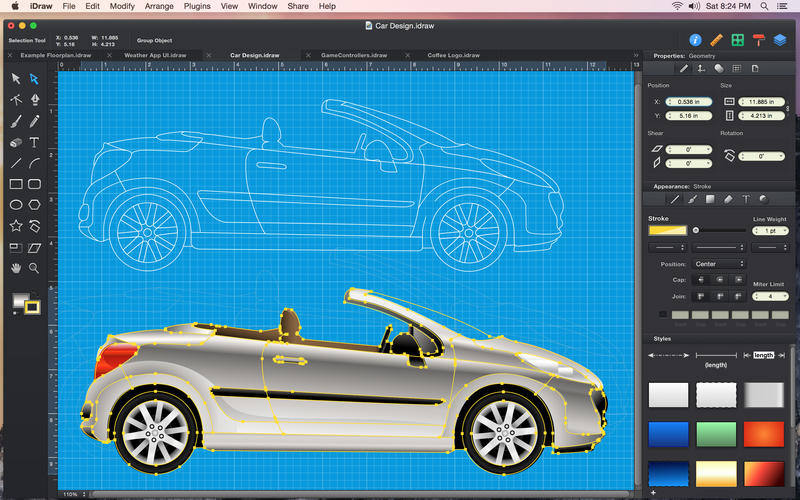
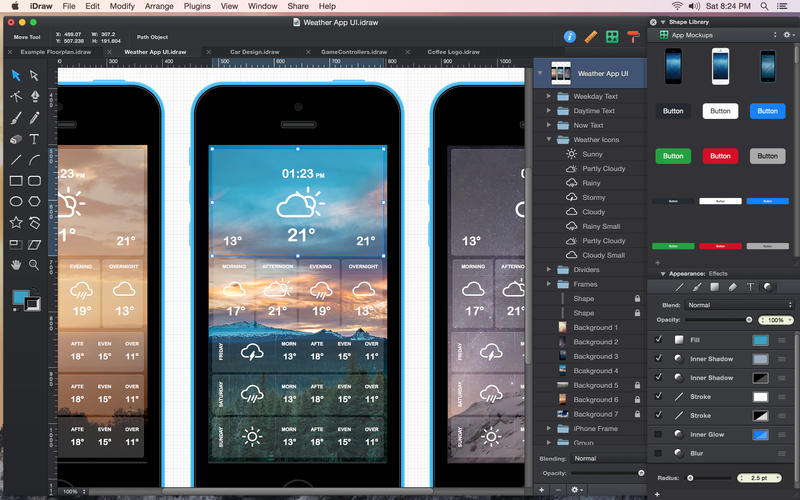
iDraw — это мощный многофункциональный и удобный редактор векторной графики и иллюстраций для Mac OS X. Программа имеет все необходимые инструменты, чтобы создать все - от подробных технических иллюстраций, до красивых произведений искусства. С iDraw создавать замысловатые рисунки становится быстро и легко.
C iDraw Вы можете импортировать PSD, SVG, PDF, EPS и экспортировать в PSD, SVG, PDF, PNG, JPEG, GIF, TIFF форматы, в Вашем распоряжении: создание слоёв, режимы наложения, редактирование текста, вставка и редактирование изображений, градиенты, выбора цвета, настраиваемые кисти, кривые Безье и многое другое …
Разработчик: Indeeo, Inc
Язык интерфейса: Английский, Французский, Немецкий, Итальянский и др.
Системные требования: Mac OSX 10.6 or later
Таблетка: Программа пролечена


- Fixes related to @2x and @3x image export.
- Fix for Eyedropper tool when setting gradient colors.
- Improvements to the new in-place settings panes.
- Other minor fixes and improvements.
New in 2.5:
Enhanced for Yosemite.
- Use Handoff to seamlessly continue editing a document on a different Mac or iPad.
- Store and access iDraw documents directly on iCloud Drive.
- Support for Handoff and iCloud Drive requires Yosemite and iOS 8.
Redesigned User Interface.
- Beautiful new interface designed for Yosemite.
- New single-window interface with in-place settings panes.
- Switch between Single Window Mode and Floating Panels (View > Show Floating Inspectors).
CMYK Colors.
- Create print-ready documents with CMYK colors.
- Assign CMYK color profiles (Modify > Color Settings…).
- Choose between RGB and CMYK document color modes.
- Export CMYK-based PDF documents.
Pattern Fills.
- Fill shapes with repeating vector patterns.
- Create new patterns from any selection of shapes.
- Use the ‘+’ button in the pattern fill popup to create a new pattern.
- Rotate and scale patterns using the settings in the Fill pane.
Clipping Paths.
- Clip objects inside vector shapes.
- Paste objects inside of a shape to create a clipping group (Edit > Paste Inside).
- Release clipping group shapes using the ungroup command (Arrange > Ungroup).
- Double-Click an object inside of a clipping group to select it directly.
Blur Effect.
- Apply a blur effect to any styled object.
- Enable, disable, and adjust blurs from the Appearance Effects pane.
- Adjust the blur radius to control the amount of blur applied.
Select Similar.
- Quickly select objects which share the same appearance settings (Edit > Select Similar…).
- Easily find and select objects based on their stroke color, fill color, opacity, etc.
- Find and select objects across all layers, or only within the currently selected layers.
Enhanced Export Options.
- Automatic @3x asset generation.
- Export bitmap and vector assets directly into Xcode xcasset folders (File > Export Layers…).
- Shadow and glow effects are now exported using SVG filters.
- Improved Swift code export for Swift 1.0 language changes.

Похожие новости
- iClock Pro 4.6.5
- Lion DiskMaker 2.0rc3 (10.6, 10.7 and OS X 10.8)
- AudioMulch 2.2.4 для Mac OS X
- Expert Designs for Adobe Photoshop and InDesign v1.1
- TechTool Protogo 4.0.5
- HueShifter 1.2.3
- iDo Notepad Pro 1.0
- Avast Mac Security 2015
- SQLPro for MySQL 1.0.315
- Twins Mini 1.2.1
- DockTime 1.1
- Templates for Keynote - DesiGN 6.0.5
- Music Binder Pro 3.5
- Tublme 1.2 - клиент для работы в сервисе микроблогов Tumblr
- Microsoft Office Standard 2016 Volume License Edition v15.23
- SketchMee 1.4
- Marked 1.4
- Together 3.5.16 - современная записная книжка
- PyCharm Professional 2018.3.4
- TemplateBox 1.0