Spectralayers Pro 3.0 для Mac OS
16.01.2015

SpectraLayers Pro для Mac — это великолепная платформа аудиомонтажа с непревзойденными возможностями обработки звука в сочетании с уникальным рабочим процессом. Отображение звуковых данных на многомерном дисплее спектров, который показывает временные и частотные события с невероятной детальностью.
Прямой доступ и управление спектрами с использованием разнообразных интеллектуальных средств редактирования. Разделение звуковых файлов на отдельные компонентные слои с последующей их индивидуальной обработкой, изменение временной привязки и высоты тона, обработка сигнала и эффектов при помощи плагинов VST, сверхточное удаление ошибок и артефактов, разделение на каналы, шумопонижение и многое другое.
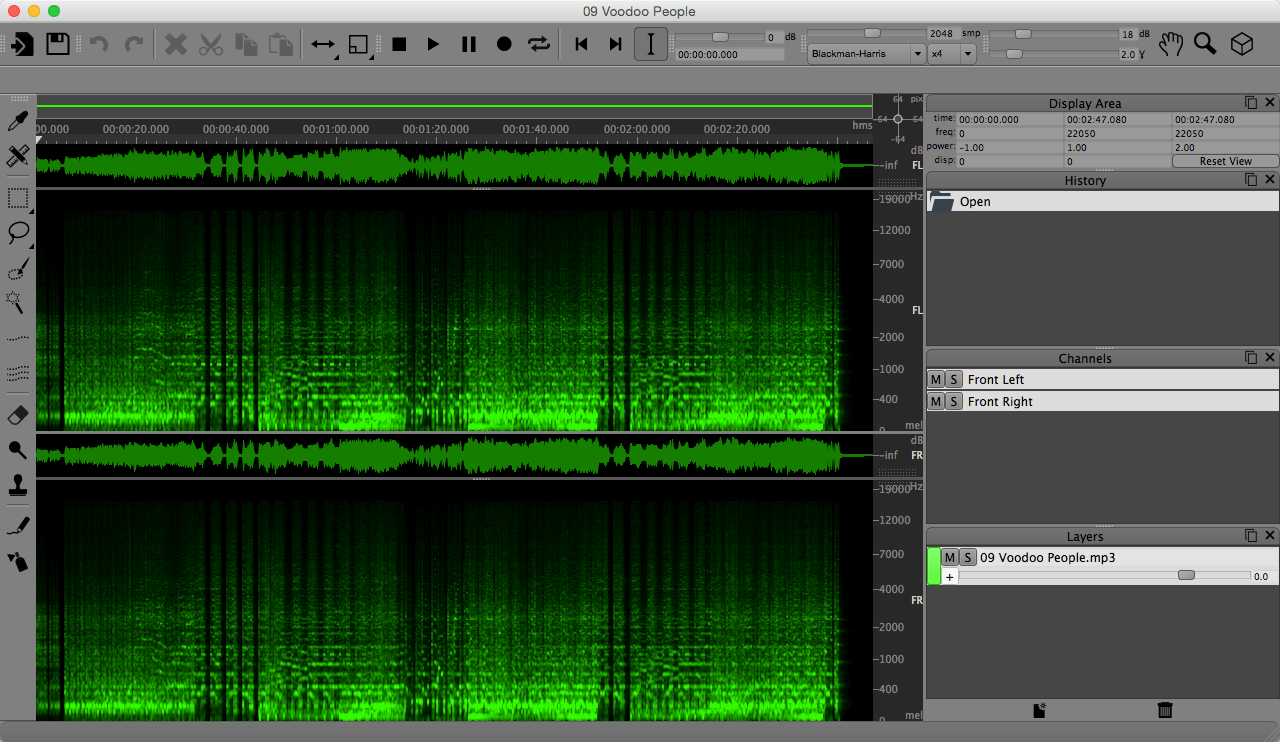
SpectraLayers Pro для Mac — важнейший инструмент для инженеров по мастерингу звука, дизайнеров звука, создателей звукового сопровождения для видео, архивистов и профессионалов, которым требуются инструменты для глубокого звукового анализа.
SpectraLayers Pro полностью меняет представления о возможностях профессиональной системы звукового монтажа, перенося самые современные средства монтажа на исключительно доступную платформу, разработанную для компьютеров Mac.
Разработчик: Sony Creative Software
Платформа: Apple Mac с процессором Intel
Системные требования: Mac OS X 10.7 (Lion), 10.8 (Mountain Lion), 10.9 (Mavericks) or 10.10 (Yosemite)
Язык интерфейса: только английский
Лечение: Не требуется (Блокируем доступ в сеть)

New Features
The 3.0 upgrade is extensive. New features include:
The 3.0 upgrade is extensive. New features include:
- Layers Panel Redesign. The new editing paradigm starts here, with a colorful, customizable system that makes working with complex multi-layer projects easy and intuitive.
- Selection Tools Redesign. The Selection Tools panel has been significantly upgraded to provide more power and versatility than ever for carving precise, tailor-made selections out of the spectral graph.
- New Waveform Display. The new Waveform Display shows selections, color-coded project layer content, relative amplitudes, and more.
- Overview Bar. The Overview Bar provides graphic, color-coded information about selection range, layer program length and location, layer phase status, mute state, and marker/region positions.
- Displacement Pad. Go multidimensional instantly with The Displacement Pad, a joystick control for changing the 3D view that features continuous access for a super-smooth 3D workflow.
- Audio Scrubbing. Use the cursor to scrub audio in both directions.
- Preferences panel. Standard configuration option controls, and all the new feature customization options, including custom routing, color-coding, and keyboard command options, are centralized here.
- Faster Processing. Engine performance is upgraded yet again for SpectraLayers Pro 3. The new logic and comprehensive CPU and GPU support translates into pure speed and silky smooth program response.
- 24-bit/192 kHz performance. Now available in SpectraLayers Pro 3.
- Surround Support. Up to eight channels of surround sound support.
- Hardware support. Including touch, trackpad, pen, Retina/high-DPI displays, and automatic detection when used with convertible laptops.
Похожие новости
- Textual 7.1.0 - IRC клиент для Mac
- Garden Planner 3.6.35
- DjVu Viewer 2.1.0
- Arrival 1.0
- Adobe Photoshop CC 2015.5.1 (17.0.1) для Mac
- Unigine Heaven Benchmark 4.0 для Mac OS
- Native Instruments Traktor Pro 3.0.1 14
- The Stanley Parable (2013)
- Wondershare DVD Creator 5.1.1.2
- VisualDiffer 1.7.0
- ScreenFloat 1.5.16
- MoneyWiz 1.6.0 - финансовый помощник для Mac OS
- Adobe Media Encoder CC 2019 v13.0.2
- iStudiez Pro 1.1.1
- MacHider 1.6.6
- Bigasoft Total Video Converter 3.7.47
- BetterZip 2.3.4 - архиватор для Mac OS
- Joe Dever's Lone Wolf HD Remastered (2014)
- Forecast Bar - Weather плюс Radar 5.2.2
- SRS iWOW Premium 3.3.1