LightPaper 1.4
11.01.2017
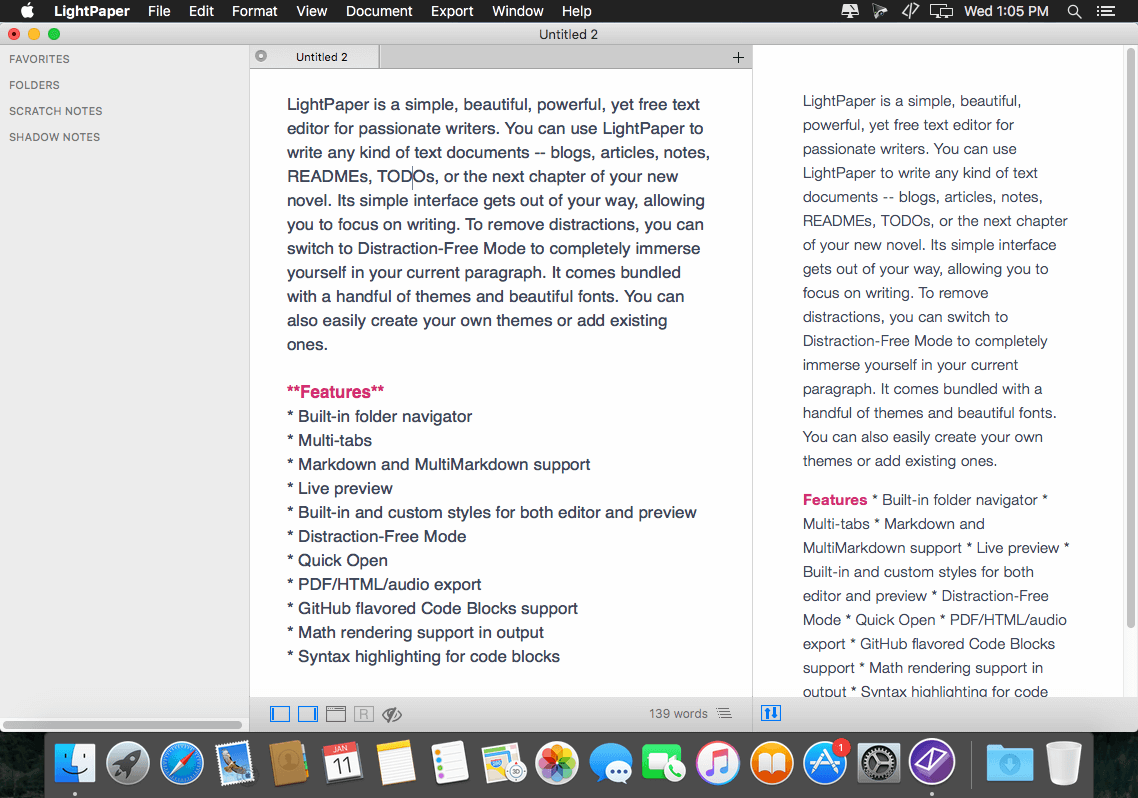
LightPaper простой, красивый, мощный текстовый редактор для страстных писателей. Вы можете использовать LightPaper для написания любых текстовых документов - блоги, статьи, заметки, файлы readme или главы вашего нового романа. Простой интерфейс позволяя вам сосредоточиться на письме. Чтобы удалить отвлекающие моменты, вы можете переключиться на Distraction-Free Mode и полностью погрузиться на текущем пункте. В комплекте с LightPaper несколько тем и красивых шрифтов. Вы также можете легко создавать свои собственные темы или добавить существующие.
Особенности
- Встроенный навигатор папок
- Мульти-табс
- Markdown и MultiMarkdown поддержка
- Shadow & Scratch заметки (Обе особенности легкодоступны в системной строке меню)
- Умный Drag-&-Drop
- Live Preview
- Встроенные и пользовательские стили для редактора и предварительного просмотра
- Distraction-Free Mode
- Quick Open
- PDF / HTML / аудио экспорт
- GitHub поддержка кодовых блоков
- Поддержка Math рендеринга на выходе
- Подсветка синтаксиса для блоков кода
- и многое другое
Что нового
Version 1.4:
Features
- New unsaved files are restored automatically when closing the application without asking you to save first. If you close a tab, however, you'll be prompted to save it first if it is unsaved.
- Added a new syntax highlighting theme - Solarized.
- One click document open. Save yourself a click as you don't have to double click to open a document. Single click will temporarily open a document. To permanently open a document, double click like usual.
- One click folder toggle. A single click will expand/ collapse a folder in the navigator.
- LightPaper Mini - added a slider to change the width/height ratio of the mini popover window. This can be accessed from the preferences.
- You can now sort sidebar items (except Folders) using different options. Right-click on one of the FAVORITES, SCRATCH NOTES, SHADOW NOTES headers for Sorting Options.
- You can now use shortcuts to jump between editor and the sidebar. See View > Jump to Sidebar and View > Jump to Editor for available shortcuts.
- You can now use CMD+ENTER to open a sidebar item instead of using your mouse and double clicking it.
Improvements
- Added a "Close All Tabs" menu item
- A document's base URL is always set to its parent folder by default
- Editor outline now recognizes --- and === tags for headers as well
- Syntax highlight now supports more languages out of the box including SQL
- Scratch and Shadow notes are now restored as well when opening the app.
- Scratch and Shadow notes are automatically saved when closing the app.
- App will now remember your expanded folders from the previous session.
- Changed the placements of both editor outline and preview outline
- LightPaper now always remembers opened folder not just when restarting the app.
- Don't autobullet if ENTER is done at the beginning of the line
- When trying to open a folder, focus it instead if it is already opened
- LightPaper now remembers the order of files when restoring them.
Bug Fixes
- Fixed a bug where margin would set to 0 for some Mac Sierra users
- Fixed a bug where the app would crash on closing if there is at least one unsaved document
- Fixed navigator jumpiness when opening a document
- Fixed a bug where sometimes multiple copies of LightPaper mini would run
- Fixed a bug where distraction free mode would show a white border when using a dark theme
- Multiple copies of mini documents are opened instead of selecting the tab
- Remove fixed header font size from default LightPaper themes
- Clicking out of a pinned shadow note without hitting save doesn't save the note in some cases.
- CMD+3 closes the external window if it is already open
- CMD+S doesn't work for an untitled document
- LightPaper Mini doesn't start for some users
- Other few minor bugfixes
Снимки экрана
- Версия: LightPaper 1.4
- Разработчик: lightpaper.42squares
- Системные требования: OS X 10.9 или более поздняя версия, 64-разрядный процессор
- Язык интерфейса: Английский
- Размер: 16.17 MB
Похожие новости
- Дмитрий Шатров. Искусство ночной съемки (2014)
- Clone X 4.3.2
- Amnesia 1.4.2
- Luminar 2018 1.3.2 (5560)
- Mac BlurayRipper Pro 1.0.4
- Strokes Maker 2.0
- World of Khaos 1.0
- Modern Translator 7.0.0
- Superhot (2016)
- Translate Tab 2.0.3
- TurboCollage 7.0.4
- MacPilot 8.1
- Easy Markdown 1.4
- Application Wizard 3.6.4
- MacBooster 3.1.6
- Wondershare Dr.Fone for Android 1.4.1
- SoftRAID 5.7.3
- Ring Menu 1.4.8
- Adobe Photoshop Lightroom 4.2. Базовый курс (2013)
- PDF Paper Renamer 1.53